How to submit a Data log on OtoSys IM100 and auro im600
2018年9月11日星期二
How to submit a Data log on OtoSys IM100 and auro im600

How to Update Auro OtoSys IM100 & IM600 software?(With IM100 Update)
Auro OtoSys Programmers enjoy One Year Free Update. You need extra subscription per year after that (price is unknown currently).
The Update application allows you to download the latest released software.
The updates can improve the OtoSys applications’ capabilities, typically by adding new tests, new models, or enhanced applications to the database.
The Display Tablet automatically searches for available updates for all of the OtoSys software when it is connected to the Internet. Any updates that are found can be downloaded and installed on the device.
The updates can improve the OtoSys applications’ capabilities, typically by adding new tests, new models, or enhanced applications to the database.
The Display Tablet automatically searches for available updates for all of the OtoSys software when it is connected to the Internet. Any updates that are found can be downloaded and installed on the device.

To update the diagnostic software and programming software:
1. Make sure the Display Tablet is connected to a power source with stable access to the Internet/WiFi.
2. Tap the Update application button from the OtoSys Job Menu; or tap the update notification message when received one; or tap the
Update icon on Vehicle Menu in Diagnostics application. The Update application screen displays.
3. Check all available updates:
If you decide to update all the items of IMMO software, select IMMO Tab and then tap the Update All button; if you want to
update all items of diagnostic software, select Diagnose Tab and then tap the Update All button.
If you only want to update one or some of the item(s), tap the Update button on the right column of the specific item(s).
4. Tap the Pause button to suspend the updating process. Tap Continue to resume the update and the process will continue from
the pause point.
5. When the updating process is completed, the firmware will be installed automatically. The new version will replace the older version.
1. Make sure the Display Tablet is connected to a power source with stable access to the Internet/WiFi.
2. Tap the Update application button from the OtoSys Job Menu; or tap the update notification message when received one; or tap the
Update icon on Vehicle Menu in Diagnostics application. The Update application screen displays.
3. Check all available updates:
If you decide to update all the items of IMMO software, select IMMO Tab and then tap the Update All button; if you want to
update all items of diagnostic software, select Diagnose Tab and then tap the Update All button.
If you only want to update one or some of the item(s), tap the Update button on the right column of the specific item(s).
4. Tap the Pause button to suspend the updating process. Tap Continue to resume the update and the process will continue from
the pause point.
5. When the updating process is completed, the firmware will be installed automatically. The new version will replace the older version.


Auro OtoSys IM100 New Release on 2018/06/21
Acura V2.25
Upgrade interface
Chrysler V2.25
Upgrade interface
Citroen V2.25
Upgrade interface
Dodge V2.25
Upgrade interface
Fiat: V2.25
Upgrade interface
Ford: V2.25
Upgrade interface
Update International models:
V2.25
2.New added the immobilizer system of Maruti Suzuki model as follow:
Blade Key Type : 800,OMNI(2007-2013/08),ALT0(2007-2010/05),ZEN ESTILO(2007-2010/05), WAGON R(2007-2010/05),SWIFT ID40/Diesel, DZIRE(ID40/Diesel, Swift ID46, DZIRE ID46,
ALTO 800, OMNI (2013/09-), ALTO (2010/06-),ZEN ESTILO (2010/06-), WAGON (2010/06-), A-STAR, SX4, ERTIGA, CELERIO, CIAZ, S-CROSS,BALENO;
Smart Key Type: ALIVIO,S,ROSS, VITRA;
3. New added the immobilizer system of Mahindra model as follow:
Blade Key Type : Scorpio(VLX,AT), Scorpio(2014), Scorpio(S4•Plus),Scorpio(S6), Scorpio(S6-Plus), Scorpio(S8), Scorpio(S10),Scorpio(S10 AT),Scorpio(S4), Scorpio(S7), Scorpio(S11), Xylo (D2), Xylo (D4), Xylo (E4), Xylo (E6), Xylo (E8), Xylo (E9) Xylo (H4), Xylo (H6),Xylo (H8), XyN (H9), XUV500(W4), XUV500(W6), XUV500 (W8),XUV500 (W10),Gento (GentoVX), Quanto(C2), Quanto(C4), Quanto(C6), Quanto(C8), Quanto(C8_AMT),TUV300,imperio, KUV100,
NuvoSport(N4),NuvoSport(N4 Plus), NuvoSport(N6),NuvoSport(N6 AMT), NuvoSport(N8), NuvoSport(N8_AMT), eVerito (d2), eVerito(D4),eVerito(D6);
4. Reading Password of 47-chip Smart Card function for Hyundai & Kia newly added.
V5.21
HONDA, ACURA, Service_HONDA, Service_ACURA
ACURA FIX:
1 Failure to perform Add Key function in certain immobilizer system
2 Safety verification error
MODIFY:
IMA Battery Replacement function in IMABAT system
OPTIMIZE:
Solenoid Valve Test function in Gearbox system
HONDA FIX:
1.Failure to perform Add Key function in certain immobilizer system
2 Safety verification error
MODIFY:
IMA Battery !Replacement function in IMABAT system
OPTIMIZE: Solenoid Valve Test function in Gearbox system
Upgrade interface
Chrysler V2.25
Upgrade interface
Citroen V2.25
Upgrade interface
Dodge V2.25
Upgrade interface
Fiat: V2.25
Upgrade interface
Ford: V2.25
Upgrade interface
Update International models:
V2.25
2.New added the immobilizer system of Maruti Suzuki model as follow:
Blade Key Type : 800,OMNI(2007-2013/08),ALT0(2007-2010/05),ZEN ESTILO(2007-2010/05), WAGON R(2007-2010/05),SWIFT ID40/Diesel, DZIRE(ID40/Diesel, Swift ID46, DZIRE ID46,
ALTO 800, OMNI (2013/09-), ALTO (2010/06-),ZEN ESTILO (2010/06-), WAGON (2010/06-), A-STAR, SX4, ERTIGA, CELERIO, CIAZ, S-CROSS,BALENO;
Smart Key Type: ALIVIO,S,ROSS, VITRA;
3. New added the immobilizer system of Mahindra model as follow:
Blade Key Type : Scorpio(VLX,AT), Scorpio(2014), Scorpio(S4•Plus),Scorpio(S6), Scorpio(S6-Plus), Scorpio(S8), Scorpio(S10),Scorpio(S10 AT),Scorpio(S4), Scorpio(S7), Scorpio(S11), Xylo (D2), Xylo (D4), Xylo (E4), Xylo (E6), Xylo (E8), Xylo (E9) Xylo (H4), Xylo (H6),Xylo (H8), XyN (H9), XUV500(W4), XUV500(W6), XUV500 (W8),XUV500 (W10),Gento (GentoVX), Quanto(C2), Quanto(C4), Quanto(C6), Quanto(C8), Quanto(C8_AMT),TUV300,imperio, KUV100,
NuvoSport(N4),NuvoSport(N4 Plus), NuvoSport(N6),NuvoSport(N6 AMT), NuvoSport(N8), NuvoSport(N8_AMT), eVerito (d2), eVerito(D4),eVerito(D6);
4. Reading Password of 47-chip Smart Card function for Hyundai & Kia newly added.
V5.21
HONDA, ACURA, Service_HONDA, Service_ACURA
ACURA FIX:
1 Failure to perform Add Key function in certain immobilizer system
2 Safety verification error
MODIFY:
IMA Battery Replacement function in IMABAT system
OPTIMIZE:
Solenoid Valve Test function in Gearbox system
HONDA FIX:
1.Failure to perform Add Key function in certain immobilizer system
2 Safety verification error
MODIFY:
IMA Battery !Replacement function in IMABAT system
OPTIMIZE: Solenoid Valve Test function in Gearbox system
Auro OtoSys IM100 New Release on 2018/06/12
Service_PORSCHE, PORSCHE
6/12/2018
PORSCHE
NEW: Prompt up of ADAS icon on ADAS-related items when performing Auto Scan
OPTIMIZE:Oil Reset function
Service_PORSCHE
NEW:DPF function added to Service module
6/12/2018
PORSCHE
NEW: Prompt up of ADAS icon on ADAS-related items when performing Auto Scan
OPTIMIZE:Oil Reset function
Service_PORSCHE
NEW:DPF function added to Service module
Auro OtoSys IM100 New Release on 2018/06/12
HONDA. ACURA. Service_HONDA, Service ACURA
V5.20 6/12/2018
ACURA
OPTIMIZE: 251 Active Test functions and Special functions for Engine, Body, Gearbox, ABS and SRS systems
HONDA
OPTIMIZE:251 Active Test functions and Special functions for Engine, Body, Gearbox, ABS and SRS systems
Servile_ACURA
OPTIMIZE: Code structure
Servile_HONDA
OPTIMIZE: Code structure
Auro OtoSys IM100 New Release on 2018/05/30
V5.20 6/12/2018
ACURA
OPTIMIZE: 251 Active Test functions and Special functions for Engine, Body, Gearbox, ABS and SRS systems
HONDA
OPTIMIZE:251 Active Test functions and Special functions for Engine, Body, Gearbox, ABS and SRS systems
Servile_ACURA
OPTIMIZE: Code structure
Servile_HONDA
OPTIMIZE: Code structure
Auro OtoSys IM100 New Release on 2018/05/30
Service_SKODA, SKODA, SEAT, Service_Lamborghini, Lamborghini, LT3, Service_VW, Service_SEAT, AUDI, Service_AUDI, VW, BUGATTI, Service-VW_CV, Service_BENTLEY, VW CV, BENTLEY
V11.30 5/30/2018
AUDI
UPDATE:
Model Selection mode and System Selection mode for models up to 2018
OPTIMIZE: Live Data texts, basic settings, adaptation, secure login, long code help, information, etc.
BENTLEY
UPDATE: Model Selection mode and System Selection mode for models up to 2018
OPTIMIZE: Live Data texts, basic settings, adaptation, secure login, long code help information, etc.
BUGATTI
NEW Model Selection mode for Bugatti models
SEAT
UPDATE: Model Selection mode and System Selection mode for models up to 2018
OPTIMIZE: Live data texts, basic settings, adaptation, secure login, long code help, information, etc.
Auro OtoSys IM100 New Release on 2018/05/26
V11.30 5/30/2018
AUDI
UPDATE:
Model Selection mode and System Selection mode for models up to 2018
OPTIMIZE: Live Data texts, basic settings, adaptation, secure login, long code help, information, etc.
BENTLEY
UPDATE: Model Selection mode and System Selection mode for models up to 2018
OPTIMIZE: Live Data texts, basic settings, adaptation, secure login, long code help information, etc.
BUGATTI
NEW Model Selection mode for Bugatti models
SEAT
UPDATE: Model Selection mode and System Selection mode for models up to 2018
OPTIMIZE: Live data texts, basic settings, adaptation, secure login, long code help, information, etc.
Auro OtoSys IM100 New Release on 2018/05/26
HONDA,ACURA,Service_HONDA,Service_Acura
Version number V1.20
Release date 2018/05/26
ACURA OPTIMIZE:
1. AutoScan fuction
2. Function menu after entering the system
2. Three special functions of the IMMO system: Replace the anti-start unit, Replace the ECM/PCM and Replace the MPCS/MICU/IMOES
3.The DTC problem of the IMA system and the basic function of the body system
NEW: 1.RC_CTM, FCVSCM, FCV, intake sounder and other systems added to the Auto Scan and Manual Selection menus
HONDA OPTIMIZE:
1. AutoScan fuction
2. Function menu after entering the system
2. Three special functions of the IMMO system: Replace the anti-start unit, Replace the ECM/PCM and Replace the MPCS/MICU/IMOES
3.The DTC problem of the IMA system and the basic function of the body system
NEW: 1.RC_CTM, FCVSCM, FCV, intake sounder and other systems added to the Auto Scan and Manual Selection menus
Auro OtoSys IM100 New Release on 2018/05/15
Version number V1.20
Release date 2018/05/26
ACURA OPTIMIZE:
1. AutoScan fuction
2. Function menu after entering the system
2. Three special functions of the IMMO system: Replace the anti-start unit, Replace the ECM/PCM and Replace the MPCS/MICU/IMOES
3.The DTC problem of the IMA system and the basic function of the body system
NEW: 1.RC_CTM, FCVSCM, FCV, intake sounder and other systems added to the Auto Scan and Manual Selection menus
HONDA OPTIMIZE:
1. AutoScan fuction
2. Function menu after entering the system
2. Three special functions of the IMMO system: Replace the anti-start unit, Replace the ECM/PCM and Replace the MPCS/MICU/IMOES
3.The DTC problem of the IMA system and the basic function of the body system
NEW: 1.RC_CTM, FCVSCM, FCV, intake sounder and other systems added to the Auto Scan and Manual Selection menus
Auro OtoSys IM100 New Release on 2018/05/15
International models
1. New added the immobilizer system of Toyota model as follow:
Europe:
Alpherd(-2005/04),Avensis(2003/01-,Camry(2003/08-),Celica,
Corolla(2000/12-), Crown(2000/12-),Highlander(2001-2003),Mr2,
Previa/Tarago,Rav4(-2003/08),Sienna, Vios,Xa, Yaris verso/Echo,
Avanza(-2014/04)
U.S.A:
Avenzz(2012-2015),Avalon HV (2013-2017), Matrix(2016-2017),Prius PHV(2010-2017)
Prius Prime(2017),Prius V(2012-2017),Rav4 EV(2012-2017),
Tacoma(2016-2017),Venza(2008-)
Japan:
Bb (2010/07-), Passo(2010/02-),
Passo Sette(2008/12-), Pixis Epoch (2012/04-),Pixis Mega (2015/07-),
Pixis Space(2011/09-), 86(2012/03-)
2. New added the immobilizer system of Lexus model as follow:
Europe:
ES300,GS300,GS430,IS200,IS300,LS400,LX470,RX300,SC300
USA:
CT200h,ES300h, ES350,GSF,GS200t,GS350,IS200t(2016-2017),IS250(2006-2015)
IS300(2016-2017),IS350(2006-2017),LC500(2018),LC500h (2018),LS430(2004-2006),
LS460(2007-2017),LS500(2018),LS600h(2008-2016),LX570(2008-2017),NX200t(2015-2017),
NX300h(2015-2017),RCF(2015-2017),RC200t(2016-2017),RC300(2015-2017),
RX350(2010-2017),RX450(2010-2017)
3. New added the immobilizer system of Hyundai model as follow:
Europe:
Tucson FFV(JM FFV)(2012-2013),Tucson(JM)(2005-2010),Terracan(HP)(2001-2006),
ELANTRA(UD)(2014-2016),i20(PB)(2009-2016),G90(H1)(2017-2018),
Grandeur/Azera(IG)(2018),HB 20(2013-2018),ix20(JC) (2011-2018)
USA :
Azera(TG)(2006-2011),Entourage(EP)(2007-2010),Santafe(CM)(2007-2012),
Sonata(NF)(2006-2010),Tiburon(GK)(2003-2008),Tucson(JM)(2005-2009),
Azera(HG)(2012-2017),Elantra coupe(JK)(2013-2015),ElantraGT(GD)(2013-2017),
Elantra(MD)(2011-2016),Elantra(UD) (2011-2016),G90(HI)(2017)
Korea :
Azera(TG)(2005-2011),Santafe(CM)(2006-2012),Sonata(NF)(2004-2014),
Equus(LZ)(2005-2009),Tucson(JM)(2004-2010),Terracan(HP)(1999-2007),
i30(GD)(2012-2016),i40(VF)(2012-2017),Elantra coupe(JK)(2013-2015),
Elantra(MD)(2011-2016),EQ900(HI)(2016),Azera hybrid (HG HEV)(2044-2017),
Azera(HG)(2011-2017),Aslan(AG)(2015-2017).
4. New added the immobilizer system of Kia model as follow:
Europe:
Carnival/Sedona(GQ) (1998-2006),Carnival/Sedona(VQ)(2006-2014),
K2500/K2700/K3000/K3000S(PU)(2004-2015),Opirus(GH)(2004-2010),
Preglo(FP)(2006),Rio(QBR)(2012-2018),Stinger(CK)(2018),Soul(AM)(2009-2014),
Venga(YN)(2010-2018),Opirus(GH)(2004-2006)
USA:
Sportage(KM)(2005-2006),Optima hybrid(TF HEV) (2011-2013),Optima(TF/OF)(2011-2013),
Rio(UB)(2012-2017),Sorento(XM)(2011-2015),Sportage(SL)(2011-2013),Soul(AM)(2010-2013)
Korea:
Grand carnival(VQ)(2005-2014),Morning(SA)(2004-2011),Bongo3(PU21)(2004-2007),
Bongo3(PU11)(2004-2016),Opirus(GH)(2007-2012),Carnival/Sedona(YP)(2015),
K5 HEV(TF HEV)(2012-2013),K5(TF)(2011-2013),RAY(TAM)(2012-2016),
Morning(TA)(2012-2016),Sportage R(SL)(2011-2016),Sorento R(XM)(2013-2014),
Pride(UB)(2012-2016),Soul(AM)(2009-2013)
1. New added the immobilizer system of Toyota model as follow:
Europe:
Alpherd(-2005/04),Avensis(2003/01-,Camry(2003/08-),Celica,
Corolla(2000/12-), Crown(2000/12-),Highlander(2001-2003),Mr2,
Previa/Tarago,Rav4(-2003/08),Sienna, Vios,Xa, Yaris verso/Echo,
Avanza(-2014/04)
U.S.A:
Avenzz(2012-2015),Avalon HV (2013-2017), Matrix(2016-2017),Prius PHV(2010-2017)
Prius Prime(2017),Prius V(2012-2017),Rav4 EV(2012-2017),
Tacoma(2016-2017),Venza(2008-)
Japan:
Bb (2010/07-), Passo(2010/02-),
Passo Sette(2008/12-), Pixis Epoch (2012/04-),Pixis Mega (2015/07-),
Pixis Space(2011/09-), 86(2012/03-)
2. New added the immobilizer system of Lexus model as follow:
Europe:
ES300,GS300,GS430,IS200,IS300,LS400,LX470,RX300,SC300
USA:
CT200h,ES300h, ES350,GSF,GS200t,GS350,IS200t(2016-2017),IS250(2006-2015)
IS300(2016-2017),IS350(2006-2017),LC500(2018),LC500h (2018),LS430(2004-2006),
LS460(2007-2017),LS500(2018),LS600h(2008-2016),LX570(2008-2017),NX200t(2015-2017),
NX300h(2015-2017),RCF(2015-2017),RC200t(2016-2017),RC300(2015-2017),
RX350(2010-2017),RX450(2010-2017)
3. New added the immobilizer system of Hyundai model as follow:
Europe:
Tucson FFV(JM FFV)(2012-2013),Tucson(JM)(2005-2010),Terracan(HP)(2001-2006),
ELANTRA(UD)(2014-2016),i20(PB)(2009-2016),G90(H1)(2017-2018),
Grandeur/Azera(IG)(2018),HB 20(2013-2018),ix20(JC) (2011-2018)
USA :
Azera(TG)(2006-2011),Entourage(EP)(2007-2010),Santafe(CM)(2007-2012),
Sonata(NF)(2006-2010),Tiburon(GK)(2003-2008),Tucson(JM)(2005-2009),
Azera(HG)(2012-2017),Elantra coupe(JK)(2013-2015),ElantraGT(GD)(2013-2017),
Elantra(MD)(2011-2016),Elantra(UD) (2011-2016),G90(HI)(2017)
Korea :
Azera(TG)(2005-2011),Santafe(CM)(2006-2012),Sonata(NF)(2004-2014),
Equus(LZ)(2005-2009),Tucson(JM)(2004-2010),Terracan(HP)(1999-2007),
i30(GD)(2012-2016),i40(VF)(2012-2017),Elantra coupe(JK)(2013-2015),
Elantra(MD)(2011-2016),EQ900(HI)(2016),Azera hybrid (HG HEV)(2044-2017),
Azera(HG)(2011-2017),Aslan(AG)(2015-2017).
4. New added the immobilizer system of Kia model as follow:
Europe:
Carnival/Sedona(GQ) (1998-2006),Carnival/Sedona(VQ)(2006-2014),
K2500/K2700/K3000/K3000S(PU)(2004-2015),Opirus(GH)(2004-2010),
Preglo(FP)(2006),Rio(QBR)(2012-2018),Stinger(CK)(2018),Soul(AM)(2009-2014),
Venga(YN)(2010-2018),Opirus(GH)(2004-2006)
USA:
Sportage(KM)(2005-2006),Optima hybrid(TF HEV) (2011-2013),Optima(TF/OF)(2011-2013),
Rio(UB)(2012-2017),Sorento(XM)(2011-2015),Sportage(SL)(2011-2013),Soul(AM)(2010-2013)
Korea:
Grand carnival(VQ)(2005-2014),Morning(SA)(2004-2011),Bongo3(PU21)(2004-2007),
Bongo3(PU11)(2004-2016),Opirus(GH)(2007-2012),Carnival/Sedona(YP)(2015),
K5 HEV(TF HEV)(2012-2013),K5(TF)(2011-2013),RAY(TAM)(2012-2016),
Morning(TA)(2012-2016),Sportage R(SL)(2011-2016),Sorento R(XM)(2013-2014),
Pride(UB)(2012-2016),Soul(AM)(2009-2013)
5. New added the immobilizer system of Ford model as follow:
Blade Key Type:
C-MAX(2005-2017),Crown vic (2005-2012),E-series (2008-2017),Edge(2007-2014),
Escape (2005-2016), Expedition / Expedition EL(2005-2017),
Explorer/ Explorer SportTrac (2004-2015),F-150(2004-2014),F-250 (2005-2016),
F-350(2004-2016),EcoSport (2006-2017),Fiesta (2006-2017), Five Hundred(2005-2007),
Flex (2009-2014), Focus (2006-2014) Mustang (2005-2014), Freestar (2004-2007),
Freestyle(2004-2007), Fusion (2006-2014), Mustang (2005-2014), Ranger (2005-2011),
Taurus (2004-2014), Kuga (2013-2016)
Smart Key Type:
Edge (2011-2014), Expedition / Expedition EL (2011-2017),
Explorer / Explorer SportTrac (2011-2015), Flex (2013-2014),
Focus (2014-2017), Focus ST(2014-2017), Focus Titanium (2015-2017),
Fusion (2013-2014), Mustang (2011-2014), Taurus (2010-2014)
Auro OtoSys IM100 New Release on 2018/04/23
Blade Key Type:
C-MAX(2005-2017),Crown vic (2005-2012),E-series (2008-2017),Edge(2007-2014),
Escape (2005-2016), Expedition / Expedition EL(2005-2017),
Explorer/ Explorer SportTrac (2004-2015),F-150(2004-2014),F-250 (2005-2016),
F-350(2004-2016),EcoSport (2006-2017),Fiesta (2006-2017), Five Hundred(2005-2007),
Flex (2009-2014), Focus (2006-2014) Mustang (2005-2014), Freestar (2004-2007),
Freestyle(2004-2007), Fusion (2006-2014), Mustang (2005-2014), Ranger (2005-2011),
Taurus (2004-2014), Kuga (2013-2016)
Smart Key Type:
Edge (2011-2014), Expedition / Expedition EL (2011-2017),
Explorer / Explorer SportTrac (2011-2015), Flex (2013-2014),
Focus (2014-2017), Focus ST(2014-2017), Focus Titanium (2015-2017),
Fusion (2013-2014), Mustang (2011-2014), Taurus (2010-2014)
Auro OtoSys IM100 New Release on 2018/04/23
VW, Audi, Bentley, Skoda, Seat V2.30
VW OPTIMIZE:
I. No disassembly needed for all IMMO functions of IMMO IV CAN Instrument under 2015-2017 vehicle model menu
2. Remote Add and Remote Learning functions added to IMMO IV CAN Instrument under 2015-2017 vehicle model menu
3. Key Learning on 2010-2013 Jetta models
4. Make Special Key function on 2010-2013 Jet models
5. Check Megamos 48 ID Validity function
6. Make IMMO V Key function improved, with auto key unlock during the process
7. Auto Backup IMMO function for K-line RB8 system when operated in Smart Mode
8. Auto Backup IMMO function for IMMO IV system when operated in Smart Mode
Auro OtoSys IM100 New Release on 2018/03/20
I. No disassembly needed for all IMMO functions of IMMO IV CAN Instrument under 2015-2017 vehicle model menu
2. Remote Add and Remote Learning functions added to IMMO IV CAN Instrument under 2015-2017 vehicle model menu
3. Key Learning on 2010-2013 Jetta models
4. Make Special Key function on 2010-2013 Jet models
5. Check Megamos 48 ID Validity function
6. Make IMMO V Key function improved, with auto key unlock during the process
7. Auto Backup IMMO function for K-line RB8 system when operated in Smart Mode
8. Auto Backup IMMO function for IMMO IV system when operated in Smart Mode
Auro OtoSys IM100 New Release on 2018/03/20
IM100 Jaguar Land rover software update to V2.22
Ineternational models:
Jaguar:
1.Added F-type 2014-2015 function: Add smart key, all smart keys lost, recover smart key
2.Added XF 2013-2015 function: Add smart key, all smart keys lost, recover smart key
3.Added XJ 2013-2015 function: Add smart key, all smart keys lost, recover smart key
4.Added a manual remote relearn method (For model SOVERIGN,S-type, XJ 2003-2007, XJR,X-Type machinery key)
Land rover:
1.Added Discovery4 2013-2014 function: Add smart key, all smart keys lost, recover smart key
2.Added Range Rover 2014-2015 function: Add smart key, all smart keys lost, recover smart key
3.Added Range Rover Evoque function: Add smart key, all smart keys lost, recover smart key
4.Added Range Rover Sport 2014-2015 function: Add smart key, all smart keys lost, recover smart key
Volvo
1.Optimized the procedure of Semi-smart keys lost, add semi-smart key on the version v2.21
1.Add V40 2012-2017 function: semi-smart keys lost, add semi-smart key
Mitsubishi:
1.Optimized the procedure of Outlander 2008-2012 machinery key immobilizer
2.Optimized the procedure of Outlander 2013- smart key immobilizer
3.Optimized the procedure of Outlander -2010 machinery key immobilizer
Chrysler:
1.Optimized the procedure of Dodge Caravan 2010-2014 machinery key immobilizer
2.Optimized the procedure of Chrysler 300C 2011- machinery key immobilizer
3.Added Dodge Challenger 2015- smart key proximity-system
Nissan:
1.Optimized the procedure of ECU_SteeringWheel on the existed menu
Ineternational models:
Jaguar:
1.Added F-type 2014-2015 function: Add smart key, all smart keys lost, recover smart key
2.Added XF 2013-2015 function: Add smart key, all smart keys lost, recover smart key
3.Added XJ 2013-2015 function: Add smart key, all smart keys lost, recover smart key
4.Added a manual remote relearn method (For model SOVERIGN,S-type, XJ 2003-2007, XJR,X-Type machinery key)
Land rover:
1.Added Discovery4 2013-2014 function: Add smart key, all smart keys lost, recover smart key
2.Added Range Rover 2014-2015 function: Add smart key, all smart keys lost, recover smart key
3.Added Range Rover Evoque function: Add smart key, all smart keys lost, recover smart key
4.Added Range Rover Sport 2014-2015 function: Add smart key, all smart keys lost, recover smart key
Volvo
1.Optimized the procedure of Semi-smart keys lost, add semi-smart key on the version v2.21
1.Add V40 2012-2017 function: semi-smart keys lost, add semi-smart key
Mitsubishi:
1.Optimized the procedure of Outlander 2008-2012 machinery key immobilizer
2.Optimized the procedure of Outlander 2013- smart key immobilizer
3.Optimized the procedure of Outlander -2010 machinery key immobilizer
Chrysler:
1.Optimized the procedure of Dodge Caravan 2010-2014 machinery key immobilizer
2.Optimized the procedure of Chrysler 300C 2011- machinery key immobilizer
3.Added Dodge Challenger 2015- smart key proximity-system
Nissan:
1.Optimized the procedure of ECU_SteeringWheel on the existed menu
IM100 Mitsubishi software update to V2.0 (2018/03/02)
New:
1. 2018 models supported
2. Three addtional models supported, i.e Europe Pajero sport/Montero sport
(KR#,KS#), Australia Pajero sport and North America Mirage G4
3. Five additional systems supported, i.e BSW, BSW (sub), e-Call, Electric Heater and FCM/LDW/AHB
4. Freeze frame function added to the Read Code function
IM100 Released Update (2018/02/24)
BMW MINI Version V1.05
BMW
1.Add Read ISN function via OBD for 5 engines (MEVD1724(N20),EVD1725(N13),MEVD172Y(N55),S63TU(S63TU),N63TU(N63TU)) under F chassis
2.Add Calculation Parameter Flash function (supporting ECU replacement function by enter VIN, vehicle Frequency and Engine ISN) under
FEM/BDC Parameter Flash function and adds support for replacement of second-hand modules and new modules.
Mini
1.Add Read ISN function via OBD for 5 engines (MEVD1724(N20),EVD1725(N13),MEVD172Y(N55),S63TU(S63TU),N63TU(N63TU)) under F chassis
2.Add Calculation Parameter Flash function (supporting ECU replacement function by enter VIN, vehicle Frequency and Engine ISN) under
FEM/BDC Parameter Flash function and adds support for replacement of second-hand modules and new modules.
VW,Audi,Bentley,Skoda, Seat V2.10
1.Add following functions in K-line instruments of Audi A4 2004-2008 Bosch RB8 encrypted version in Expert mode: EEPROM Backup, Restore EEPROM,
Repair Vehicle Start-up issue, Reset Instrument.
2.Add Vehicle Data Backup function in K-line instruments of Audi A4 2004-2008 Bosch RB8 encrypted version in Smart mode
3.Optimizes immobilizer-related functions for 2008-2013 Lavida.
1. 2018 models supported
2. Three addtional models supported, i.e Europe Pajero sport/Montero sport
(KR#,KS#), Australia Pajero sport and North America Mirage G4
3. Five additional systems supported, i.e BSW, BSW (sub), e-Call, Electric Heater and FCM/LDW/AHB
4. Freeze frame function added to the Read Code function
IM100 Released Update (2018/02/24)
BMW MINI Version V1.05
BMW
1.Add Read ISN function via OBD for 5 engines (MEVD1724(N20),EVD1725(N13),MEVD172Y(N55),S63TU(S63TU),N63TU(N63TU)) under F chassis
2.Add Calculation Parameter Flash function (supporting ECU replacement function by enter VIN, vehicle Frequency and Engine ISN) under
FEM/BDC Parameter Flash function and adds support for replacement of second-hand modules and new modules.
Mini
1.Add Read ISN function via OBD for 5 engines (MEVD1724(N20),EVD1725(N13),MEVD172Y(N55),S63TU(S63TU),N63TU(N63TU)) under F chassis
2.Add Calculation Parameter Flash function (supporting ECU replacement function by enter VIN, vehicle Frequency and Engine ISN) under
FEM/BDC Parameter Flash function and adds support for replacement of second-hand modules and new modules.
VW,Audi,Bentley,Skoda, Seat V2.10
1.Add following functions in K-line instruments of Audi A4 2004-2008 Bosch RB8 encrypted version in Expert mode: EEPROM Backup, Restore EEPROM,
Repair Vehicle Start-up issue, Reset Instrument.
2.Add Vehicle Data Backup function in K-line instruments of Audi A4 2004-2008 Bosch RB8 encrypted version in Smart mode
3.Optimizes immobilizer-related functions for 2008-2013 Lavida.
If you are interested in AURO OtoSys IM600 , please contact us:
1. Online Customer Service
2. Email: sales@OBDexpress.co.uk
3. Skype: obd2express.co.uk
4. WhatsApp: +86-18750906257
2. Email: sales@OBDexpress.co.uk
3. Skype: obd2express.co.uk
4. WhatsApp: +86-18750906257
2018年9月10日星期一
IMMO Functions: OtoSys IM100 + UP400 = OtoSys IM600
This is for those need a AURO Otosys for key programming only, but don’t need auto diagnostics.
Confirmed! OtoSys 100 will be able to do the same key programming as im600
About same, but if you need to do Mercedes-Benz, you need to buy a UP400 programmer
IM100+UP400 will have the same immo functions as IM600
With the up400 apart from the Mercedes key programming, your Otosys IM100 will have features like bmw cas4 key learning, 2015-2018 Land Rover&Jaguar Key Writing, Volvo Smart Key Learning
Most require eeprom work!
Otosys IM100 will work like Auro IM600 for immobilizer features and read PIN/CS from AUDI Q5/A4/A5 2015-2017 and learn keys to Mercedes-Benz

OtoSys IM100 immobilizer functions:
| Immobilizer functions and features | Otosys IM100 | Otosys IM600 |
| Smart Mode (Guided and Automated Key Learning Function) | X | X |
| Auto Detect Make/Model/Year/System | X | X |
| Read PIN/CS | X | X |
| Read PIN/CS (All Keys Lost) | X | X |
| Key Learning | X | X |
| IMMO ECU Reset/Adaption | X | X |
| IMMO ECU Refresh/Coding | X | X |
| Remote Learning | X | X |
| AUDI Q5/A4/A5 2015-2017 Read PIN/CS | With UP400 | X |
| BMW FEM/BDC Key Learning and Adaption | X | X |
| Mercedes Key Learning | With UP400 | X |
Tech support from:http://blog.obdexpress.co.uk/2018/09/11/immo-functions-otosys-im100-up400-otosys-im600/
Contact with our customer service center to get best price:
2. Email: sales@OBDexpress.co.uk
3. Skype: obd2express.co.uk
4. WhatsApp: +86-18750906257
IM600 hardware version too low - solution
Q:I have an Auro otosys IM600 and I want to read a cas4 module from bmw and at the time of reading I get a legend that says CONTACT YOUR DEALER BECAUSE THE HARDWARE VERSION OF THE PROGRAMMER IS TOO LOW. The newest upgrade says it will write BMW CAS4 (check Auro new upgrade content in the end)

Reply:
Hi, the new upgrade requires higher version UP400, you can send the up400 to where you bought the equipment to be updated in hardware. Then it will compatible with new features.
Hi, the new upgrade requires higher version UP400, you can send the up400 to where you bought the equipment to be updated in hardware. Then it will compatible with new features.
Don’t forget to provide your Auro serial number, including, IM600/IM100 tablet, J2534 box and UP200/UP400 programmer. You can find S/N on the back of the main host.


Tech support:OBDexpress.co.uk
1. Online Customer Service
2. Email: sales@OBDexpress.co.uk
3. Skype: obd2express.co.uk
4. WhatsApp: +86-18750906257
Best regards!
2018年6月20日星期三
Reviews needed: Auro OtoSys IM100/IM600
Is this tool as good as it looks?
Does everything pretty much.
YouTube videos of it getting mac/cs/pin from Simos and edc17s etc without opening, key programming even in 2017 cars vag 4th immo, etc..
Plus oe level diagnosis, Eeprom reading etc etc..
Really this good? Or all bull and Chinese lies..?
I think it's made by autel, I've used their stuff before and been ok
Maybe here we should start reviews and what doesn't work.
Here is all what I have found on the web. Hope it help you guys also.
Auro OtoSys IM100/IM600 tests on cars:
Failed:
2015 jeep grand Cherokee: Did not pull pin then locked my out.
Cannot get the PIN: The 100 didn't give you options to get the PIN code
Success:
2013 Dodge Ram 1500s: Did fobik (non prox) key
it would not learn the key on the immo side but if you used the diagnostic side and ID’d the vehicle and went into the RF hub... I was able to program the fobik key. NOTE: I wasn’t able to pull the pin on either side (immo or diagnostic)
2014 Chevy impala: Did not program the key
With Im 600. Did 12 minutes but the light stay lit. Used different machine to do a 12 minute.
2017 Honda Accord Sport Editon: added a new key
2015 Camry H chip: new key programmed
2011 & 2015 Sienna: added a new key
2014 Sienna w/ Proximity: added new keys
2015 plate a4: Did a spare key, AVDI said no other than that is piss poor
Auro OtoSys IM100/IM600 user experience:
Great function: So is the machine will have great functions and will be one of the best I have two but right now a lot of people do not want it because it has some errors but if it works I have been using it and if it works
Chance to diagnosis, programming and parameters: The team if you work. It is not recommended as the first programming team. For Price. Other more economic teams are recommended and then set up. But I've had a chance to diagnosis, module programming and booking of parameters. etc
Pretty streamline: The price $3500 is a bit much off obdexpress.co.uk it sure is a great kit though. Made it pretty streamline if you’ve used an Autel
Good diagnostic but Limited Immo: Diagnostic side of the house no doubt about it. My point is its immo/key programming capabilities is too limited at the moment for its price.
Clone fobik keys: I have the im600 what menu do you go to when you trying to flash a ECU or BCM can Im600 clone fobik keys
Ford IMMO: Very pleased to see the update Ford IMMO into Auro IM100 and IM600
New: its a new tool and they to test it thoroughly before releasing it to the market. Its trend with all tools from Asia
Easy to use: The reason I’m thinking of getting this unit is it looks very easy to use as I go out to more and more non start cars with the immobiliser light flashing and need to interrogate the immobiliser Ecu as our current mobile locksmiths have made so much money that they can’t now be bothered to check a system for £50 cash which leaves the customer high and dry. But at £2500 its a major investment which will take a long time to break even
Fast and good: Im600 they look pretty good and they have a good future is fast but no updates very few
Pretty: It’s pretty kick butt. Did Honda’s, Toyota and even Volkswagens
Src:http://blog.obdexpress.co.uk/2018/06/21/reviews-needed-auro-otosys-im100-im600/
Does everything pretty much.
YouTube videos of it getting mac/cs/pin from Simos and edc17s etc without opening, key programming even in 2017 cars vag 4th immo, etc..
Plus oe level diagnosis, Eeprom reading etc etc..
Really this good? Or all bull and Chinese lies..?
I think it's made by autel, I've used their stuff before and been ok
Maybe here we should start reviews and what doesn't work.
Here is all what I have found on the web. Hope it help you guys also.
Auro OtoSys IM100/IM600 tests on cars:
Failed:
2015 jeep grand Cherokee: Did not pull pin then locked my out.
Cannot get the PIN: The 100 didn't give you options to get the PIN code
Success:
2013 Dodge Ram 1500s: Did fobik (non prox) key
it would not learn the key on the immo side but if you used the diagnostic side and ID’d the vehicle and went into the RF hub... I was able to program the fobik key. NOTE: I wasn’t able to pull the pin on either side (immo or diagnostic)
2014 Chevy impala: Did not program the key
With Im 600. Did 12 minutes but the light stay lit. Used different machine to do a 12 minute.
2017 Honda Accord Sport Editon: added a new key
2015 Camry H chip: new key programmed
2011 & 2015 Sienna: added a new key
2014 Sienna w/ Proximity: added new keys
2015 plate a4: Did a spare key, AVDI said no other than that is piss poor
Auro OtoSys IM100/IM600 user experience:
Great function: So is the machine will have great functions and will be one of the best I have two but right now a lot of people do not want it because it has some errors but if it works I have been using it and if it works
Chance to diagnosis, programming and parameters: The team if you work. It is not recommended as the first programming team. For Price. Other more economic teams are recommended and then set up. But I've had a chance to diagnosis, module programming and booking of parameters. etc
Pretty streamline: The price $3500 is a bit much off obdexpress.co.uk it sure is a great kit though. Made it pretty streamline if you’ve used an Autel
Good diagnostic but Limited Immo: Diagnostic side of the house no doubt about it. My point is its immo/key programming capabilities is too limited at the moment for its price.
Clone fobik keys: I have the im600 what menu do you go to when you trying to flash a ECU or BCM can Im600 clone fobik keys
Ford IMMO: Very pleased to see the update Ford IMMO into Auro IM100 and IM600
New: its a new tool and they to test it thoroughly before releasing it to the market. Its trend with all tools from Asia
Easy to use: The reason I’m thinking of getting this unit is it looks very easy to use as I go out to more and more non start cars with the immobiliser light flashing and need to interrogate the immobiliser Ecu as our current mobile locksmiths have made so much money that they can’t now be bothered to check a system for £50 cash which leaves the customer high and dry. But at £2500 its a major investment which will take a long time to break even
Fast and good: Im600 they look pretty good and they have a good future is fast but no updates very few
Pretty: It’s pretty kick butt. Did Honda’s, Toyota and even Volkswagens
Src:http://blog.obdexpress.co.uk/2018/06/21/reviews-needed-auro-otosys-im100-im600/
2018年4月18日星期三
Auro otosys IM600 VS.Autel/Launch X431,IM600 Wins!
- read/writeMCU & EEPROM chips
- read/writeIC card
- detectRemote control frequency
- read/writeMercedes infrared key
The functions cannot be realized by the Launch/Autel.
Besides, AURO works good in basic diagnostic, immo and service functions.
Good diagnostic performance:
- Widevehicle coverage for more than 80 US, Asian and European vehicle makes.
- Complete capabilities for codes, live data, actuation tests, adaptations.
- Displays live data in text, graph, analog and digital gauge for easy data review and analysis.
- Auto VIN technology can automatically identify the vehicle’s make, model and year information in no time.
Auto key programming – Perfect:
Smart mode:
Smart Mode for guided and automated key learning
Expert mode:
Expert Mode for advanced key learning functions, uncluding:
Read PIN/CS
Read PIN/CS (All Keys Lost)
IMMO ECU Reset/Adaption
IMMO ECU Reflash/Coding
Remote Learning
Backup/restore EEPROM data
Backup/restore IMMO data
BMW FEM/BDC Key Learning and Adaption
Audi Q5/A4/A5 2015-2017 Read PIN/CS
Read PIN/CS (All Keys Lost)
IMMO ECU Reset/Adaption
IMMO ECU Reflash/Coding
Remote Learning
Backup/restore EEPROM data
Backup/restore IMMO data
BMW FEM/BDC Key Learning and Adaption
Audi Q5/A4/A5 2015-2017 Read PIN/CS
Advanced Service Functions – No issues!
OtoSys IM600 offers time-saving shorcuts to access all the commom service functions with one touch of the screen.
- Direct access to complete service functions including:
- Relearn parking brake pad after replacement (EPB)
- Support forced DPF regeneration and adjusting injectors (DPF)
- Reset Steering angle sensor (SAS)
- Reset service mileage and service intervals (Oil Reset)
- RelearnTPMS sensor (TPMS)
- Register and resetbattery(BMS)
Skype: obd2express.co.uk
Email: sales@OBDexpress.co.uk
Email: sales@OBDexpress.co.uk
2018年3月27日星期二
How to conduct BMW key learning with Auro OtoSys IM600 Smart Mode and Expert Mode
This Auro OtoSys IM600 user manual of how-to :
1.Key learnning via Auro OtoSys 6M100 Smart Mode.
2.Key learnning via Auro OtoSys 6M100 Expert Mode.
3.Disassemble the ECU Modul
4.Connect the Test Wire Harness and OBD Cable
5.Disassemble the EEPROM Chip
Here we go:
User manual PDF download:http://www.obdexpress.co.uk/upload/pro/im600-bmw-key-learning.pdf
Two options are available when accessing the IMMO function:
Smart Mode – the IM600 tablet will read the vehicle information and analyze the
IMMO part information automatically.
Expert Mode – user can make selections step by step to locate the IMMO part.
Procedures before getting started:
1. Connect the OtoFlash to the vehicle’s DLC via the main cable for both
communication and power source.
2. Connect the OtoFlash to the tablet via BT pairing, or USB connection.
3. Connect the IM600 tablet to the included programmer UP400 via USB cable.
4. Dismount the ECU module from the vehicle
5. Connect the ECU module to the Emergency coil stretched out from COM7.
6. Connect one end of the included OBD cable to the IM600 tablet, while the other
end needs to be connected to the wire harness stretched out from COM8 on the
ECU module. The wire harness is not included, you could DIY.
7. Make sure the user has access to WiFi service in case you need to send the
operation data.
NOTE
Illustrations used in this manual are samples, and the actual testing screens may
vary by vehicle. Observe the menu titles and on-screen instructions to make correct
selections and operations.
vehicle menu displays and a disclaimer prompts up. Tap Accept to continue.


2. Connect the IM600 tablet to WiFi in case you need to send the operation data, then
go back to the vehicle menu.

3. Tap BMW on the vehicle menu, then tap Smart Mode on the Mode Select interface.
NOTE
You can click on the icon near the top-right corner to record the operation data. If
you encounter any difficulties, click on the icon again to send us the data and
problems, so that our engineers could help


4. Make sure the engine is off, tap OK on the information interface. The IM600 tablet
starts to read vehicle information automatically.
NOTE
The ECU module is detected automatically under the Smart Mode. Check the ECU
module in ECU information at the bottom of the vehicle information interface.


5. Tap OK on the vehicle information interface, the IM600 tablet starts to backup coding
files automatically

6. After coding files backup, disassemble the EEPROM chip and connect it to the
programmer for backing up and modifying EEPROM data. Tap OK when operation
over.
NOTE
Tap Diagram on the information interface for the EEPROM chip location. For
more details about disassembling the EEPROM chip.
Turn off the +12V power first.


7. Install the EEPROM chip back to the ECU module after modifying EEPROM data.
Tap OK when operation over. Programing starts automatically.


8. After programming, disassemble the EEPROM chip and connect it to the
programmer for restoring the EEPROM data.
NOTE
Tap Diagram on the information interface for the EEPROM chip location. For
more details about disassembling the EEPROM chip, please refer to Appendix
on page 37.
Turn off the +12V power first.


9. Install the EEPROM chip back to the ECU module after restoring EEPROM data.
Tap OK when operation over

10. Restoring coding files starts automatically after installation the EEPROM chip back.
Pay attention to the notes displayed on the interface. Tap OK to proceed.


11. Key learning starts automatically after restoring coding files. Pay attention to the
operation guide. Tap OK to proceed.


12. Tap Read password on the Key Learning interface. Proceed as information
displayed. Tap OK on the key password information interface, go back to the Key
Learning interface.
NOTE
The ISN code is needed if you have no working keys with key learning.


13. Select a free key to write. Tap Write key. Proceed as information displayed. Tap OK
when operation over.
NOTE
Repeat Write key procedures if you need more than one newly-learned key


14. Tap OK on the Write key success interface, go back to the Key Learning interface.
The key ID status of the selected key becomes “Used”. Key learning via Smart Mode
completes.
NOTE
If keys are lost, select the corresponding keys on the interface, tap Erase key to
delete the lost keys.


vehicle menu displays and a disclaimer prompts up. Tap Accept to continue.

2. Connect the IM600 tablet to WiFi in case you need to send the operation data, then
go back to the vehicle menu.

3. Tap BMW on the vehicle menu, then tap Expert Mode on the Mode Select interface.
Pay attention to the Notice interface, tap OK to proceed.
NOTE
You can click on the icon near the top-right corner to record the operation data. If
you encounter any difficulties, click on the icon again to send us the data and
problems, so that our engineers could help.


4. Tap FEM/BDC on the Expert mode interface to the FEM/BDC Function Select
interface.

5. Tap Vehicle information to check the vehicle information. Tap ESC to the FEM/BDC
Function Select interface.
NOTE
Check the ECU module in ECU information at the bottom of the vehicle information
interface.


6. Tap Coding operation > Backup coding to back up coding files. Save the file after
backup successful. Tap OK > ESC, go back to the FEM/BDC Function Select
interface.


7. Tap EEPROM operation on the FEM/DBC Function Select interface. The Model
Selection interface displays, M95128 is corresponding to FEM module, and M95256
is corresponding to BDC module. Take FEM module as an example here, tap
M95128. The M95128 Function Select interface displays.
NOTE
Tap Diagram for the EEPROM chip position.
Turn off the +12V power first, then disassemble the EEPROM chip and connect
it to the programmer.


9. Tap Modify data file after Reading operation. Select the source (original) file to
modify.


10. Save the modified EEPROM data. Go back to the M95128 Function Select interface.

11. Tap Write operation. Select the modified EEPROM data to write. After writing
successfully, turn off the +12V power, install the EEPROM chip back to the FEM
module. Go back to the FEM/BDC Function Select interface.


12. Tap Programming operation > ECU preprocessing. Make sure the three
operations listed have been taken, tap Yes and proceed.


13. Pay attention to the Note interface, tap OK to proceed. Go back to the FEM/BDC
Function Select interface after programming successful.


14. Tap EEPROM operation. Turn off the +12V power, disassemble the EEPROM chip.
Tap M95128 > Write operation. Select the original file to write. After written
successfully, go back to the FEM/BDC Function Select interface, turn off the +12V
power, install the EEPROM chip back to the FEM module.


15. Tap Coding operation on the FEM/BDC Function Select interface.

16. Tap Restore coding on the Coding operation Function Select interface. Select the
initial coding file to restore. Go back to the FEM/BDC Function Select interface after
restoration.


17. Tap Key learning on the FEM/BDC Function Select interface. The Key learning
procedures of Expert Mode is the same as that of Smart Mode. Please refer to step
11 to step 14 of Key Learning via Smart Mode.
Procedures to disassemble the ECU module from the vehicle:
1. Unclip the front door sill cover strip at the passenger side.
2. Remove the bottom right instrument trim panel and disconnect plug connections
behind it.
3. Remove the side trim panel at the passenger side.
4. Remove the cover at the lower part of the module.
5. Unlock the positive battery cable connector.
6. Disconnect the plug connections to the module.
7. Release the bolt from the module.
8. Remove the module from the vehicle
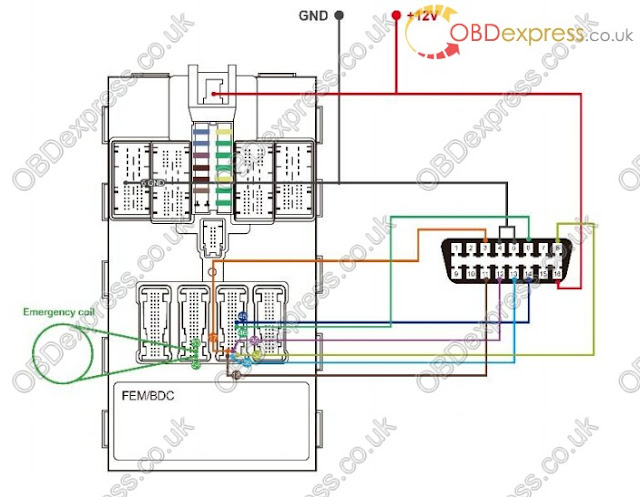
Connect the Test Wire Harness and OBD Cable
Details to connect the test wire harness and OBD cable are shown below. Make sure
wires are connected to the right pins.
Procedures to connect the test wire harness and OBD cable:
1. Connect cables to corresponding pins according to the number shown in the
figure.
2. Connect another side of the wire harness of these cables to the OBD female
adapter.
3. Connector the emergency coil to the corresponding pins according to the
numbers.

Disassemble the EEPROM Chip
Procedures to disassemble the EEPROM chip are shown below:
1. Find the chip in the ECU module.
2. Disassemble the EEPROM chip and figure out the pin 1, the bevel side on the
right, viewed from the cross section.
3. Assemble the chip in the clamp, match the pin 1 of the chip with that on the
clamp


1.Key learnning via Auro OtoSys 6M100 Smart Mode.
2.Key learnning via Auro OtoSys 6M100 Expert Mode.
3.Disassemble the ECU Modul
4.Connect the Test Wire Harness and OBD Cable
5.Disassemble the EEPROM Chip
Here we go:
User manual PDF download:http://www.obdexpress.co.uk/upload/pro/im600-bmw-key-learning.pdf
Two options are available when accessing the IMMO function:
Smart Mode – the IM600 tablet will read the vehicle information and analyze the
IMMO part information automatically.
Expert Mode – user can make selections step by step to locate the IMMO part.
Procedures before getting started:
1. Connect the OtoFlash to the vehicle’s DLC via the main cable for both
communication and power source.
2. Connect the OtoFlash to the tablet via BT pairing, or USB connection.
3. Connect the IM600 tablet to the included programmer UP400 via USB cable.
4. Dismount the ECU module from the vehicle
5. Connect the ECU module to the Emergency coil stretched out from COM7.
6. Connect one end of the included OBD cable to the IM600 tablet, while the other
end needs to be connected to the wire harness stretched out from COM8 on the
ECU module. The wire harness is not included, you could DIY.
7. Make sure the user has access to WiFi service in case you need to send the
operation data.
NOTE
Illustrations used in this manual are samples, and the actual testing screens may
vary by vehicle. Observe the menu titles and on-screen instructions to make correct
selections and operations.
Key Learning via Smart Mode
1. Turn on the IM600 tablet, tap OtoSys on the main interface screen, then IMMO. Avehicle menu displays and a disclaimer prompts up. Tap Accept to continue.
2. Connect the IM600 tablet to WiFi in case you need to send the operation data, then
go back to the vehicle menu.
3. Tap BMW on the vehicle menu, then tap Smart Mode on the Mode Select interface.
NOTE
You can click on the icon near the top-right corner to record the operation data. If
you encounter any difficulties, click on the icon again to send us the data and
problems, so that our engineers could help
4. Make sure the engine is off, tap OK on the information interface. The IM600 tablet
starts to read vehicle information automatically.
NOTE
The ECU module is detected automatically under the Smart Mode. Check the ECU
module in ECU information at the bottom of the vehicle information interface.
5. Tap OK on the vehicle information interface, the IM600 tablet starts to backup coding
files automatically
6. After coding files backup, disassemble the EEPROM chip and connect it to the
programmer for backing up and modifying EEPROM data. Tap OK when operation
over.
NOTE
Tap Diagram on the information interface for the EEPROM chip location. For
more details about disassembling the EEPROM chip.
Turn off the +12V power first.
7. Install the EEPROM chip back to the ECU module after modifying EEPROM data.
Tap OK when operation over. Programing starts automatically.
8. After programming, disassemble the EEPROM chip and connect it to the
programmer for restoring the EEPROM data.
NOTE
Tap Diagram on the information interface for the EEPROM chip location. For
more details about disassembling the EEPROM chip, please refer to Appendix
on page 37.
Turn off the +12V power first.
9. Install the EEPROM chip back to the ECU module after restoring EEPROM data.
Tap OK when operation over
10. Restoring coding files starts automatically after installation the EEPROM chip back.
Pay attention to the notes displayed on the interface. Tap OK to proceed.
11. Key learning starts automatically after restoring coding files. Pay attention to the
operation guide. Tap OK to proceed.
12. Tap Read password on the Key Learning interface. Proceed as information
displayed. Tap OK on the key password information interface, go back to the Key
Learning interface.
NOTE
The ISN code is needed if you have no working keys with key learning.
13. Select a free key to write. Tap Write key. Proceed as information displayed. Tap OK
when operation over.
NOTE
Repeat Write key procedures if you need more than one newly-learned key
14. Tap OK on the Write key success interface, go back to the Key Learning interface.
The key ID status of the selected key becomes “Used”. Key learning via Smart Mode
completes.
NOTE
If keys are lost, select the corresponding keys on the interface, tap Erase key to
delete the lost keys.
Key Learning via Expert Mode
1. Turn on the IM600 tablet, tap OtoSys on the main interface screen, then IMMO. Avehicle menu displays and a disclaimer prompts up. Tap Accept to continue.
33
2. Connect the IM600 tablet to WiFi in case you need to send the operation data, then
go back to the vehicle menu.
3. Tap BMW on the vehicle menu, then tap Expert Mode on the Mode Select interface.
Pay attention to the Notice interface, tap OK to proceed.
NOTE
You can click on the icon near the top-right corner to record the operation data. If
you encounter any difficulties, click on the icon again to send us the data and
problems, so that our engineers could help.
4. Tap FEM/BDC on the Expert mode interface to the FEM/BDC Function Select
interface.
5. Tap Vehicle information to check the vehicle information. Tap ESC to the FEM/BDC
Function Select interface.
NOTE
Check the ECU module in ECU information at the bottom of the vehicle information
interface.
6. Tap Coding operation > Backup coding to back up coding files. Save the file after
backup successful. Tap OK > ESC, go back to the FEM/BDC Function Select
interface.
7. Tap EEPROM operation on the FEM/DBC Function Select interface. The Model
Selection interface displays, M95128 is corresponding to FEM module, and M95256
is corresponding to BDC module. Take FEM module as an example here, tap
M95128. The M95128 Function Select interface displays.
NOTE
Tap Diagram for the EEPROM chip position.
Turn off the +12V power first, then disassemble the EEPROM chip and connect
it to the programmer.
9. Tap Modify data file after Reading operation. Select the source (original) file to
modify.
10. Save the modified EEPROM data. Go back to the M95128 Function Select interface.
11. Tap Write operation. Select the modified EEPROM data to write. After writing
successfully, turn off the +12V power, install the EEPROM chip back to the FEM
module. Go back to the FEM/BDC Function Select interface.
12. Tap Programming operation > ECU preprocessing. Make sure the three
operations listed have been taken, tap Yes and proceed.
13. Pay attention to the Note interface, tap OK to proceed. Go back to the FEM/BDC
Function Select interface after programming successful.
14. Tap EEPROM operation. Turn off the +12V power, disassemble the EEPROM chip.
Tap M95128 > Write operation. Select the original file to write. After written
successfully, go back to the FEM/BDC Function Select interface, turn off the +12V
power, install the EEPROM chip back to the FEM module.
15. Tap Coding operation on the FEM/BDC Function Select interface.
16. Tap Restore coding on the Coding operation Function Select interface. Select the
initial coding file to restore. Go back to the FEM/BDC Function Select interface after
restoration.
17. Tap Key learning on the FEM/BDC Function Select interface. The Key learning
procedures of Expert Mode is the same as that of Smart Mode. Please refer to step
11 to step 14 of Key Learning via Smart Mode.
Disassemble the ECU Module
The FEM/BDC module is located at the A-pillar of the front passenger side. Procedures to disassemble the ECU module from the vehicle:
1. Unclip the front door sill cover strip at the passenger side.
2. Remove the bottom right instrument trim panel and disconnect plug connections
behind it.
3. Remove the side trim panel at the passenger side.
4. Remove the cover at the lower part of the module.
5. Unlock the positive battery cable connector.
6. Disconnect the plug connections to the module.
7. Release the bolt from the module.
8. Remove the module from the vehicle
Connect the Test Wire Harness and OBD Cable
Details to connect the test wire harness and OBD cable are shown below. Make sure
wires are connected to the right pins.
Procedures to connect the test wire harness and OBD cable:
1. Connect cables to corresponding pins according to the number shown in the
figure.
2. Connect another side of the wire harness of these cables to the OBD female
adapter.
3. Connector the emergency coil to the corresponding pins according to the
numbers.


Disassemble the EEPROM Chip
Procedures to disassemble the EEPROM chip are shown below:
1. Find the chip in the ECU module.
2. Disassemble the EEPROM chip and figure out the pin 1, the bevel side on the
right, viewed from the cross section.
3. Assemble the chip in the clamp, match the pin 1 of the chip with that on the
clamp
订阅:
博文 (Atom)
KESS V2 Ksuite Software Free Download
Customer Question: I have the KESS V2 4.036 with the K-Suite 2.33 on It but my CD is damaged and my pc can’t read it anymore. How to solv...

-
 This is the step-by-step guide of how to conduct 2004-2007 Chrysler Key Learning on Auro OtoSys IM100 Here we go ! Attach PDF : http...
 -
 Here's the instruction on how to conduct Nissan TEANA 2014/8-2015/2 key learning with Auro OtoSys IM100 Immobilizer/Smart key system. ...
 -
 This is for those need a AURO Otosys for key programming only, but don’t need auto diagnostics. Confirmed! OtoSys 100 will be able to...